
Cancel or correct an invoice
An issued invoice is wrong? A cancellation invoice reverses all of it, a credit note reduces part of it. How both work in Norman.
Updated
You can still edit an open or overdue invoice. Once it is paid, you reverse it with a cancellation invoice or reduce it with a credit note. Both documents name the original invoice, and your numbering stays without gaps, as the GoBD require.
Edit, cancel or correct?
| Situation | What you do |
|---|---|
| The invoice is a draft | Edit the draft. |
| The invoice is open or overdue | Edit it. If you already sent it, send it again afterwards. |
| The invoice is paid | Create a cancellation invoice or a credit note. |
| The invoice is wrong as a whole, for example the wrong client or issued twice | Create a cancellation invoice. |
| Part of it is wrong, for example too many hours or a price that is too high | Create a credit note. |
| You charged too little | Issue another invoice for the missing part. |
Cancel an invoice
- Open Invoices. Open the invoice menu, or click the invoice to see its details.
- Choose Create cancellation invoice.
- Norman asks Cancel this invoice? and explains what happens. If the invoice already has a credit note, Norman names it with its number and amount. This is only a hint, you can still cancel.
- Click Yes, cancel the invoice. Keep the invoice stops here.
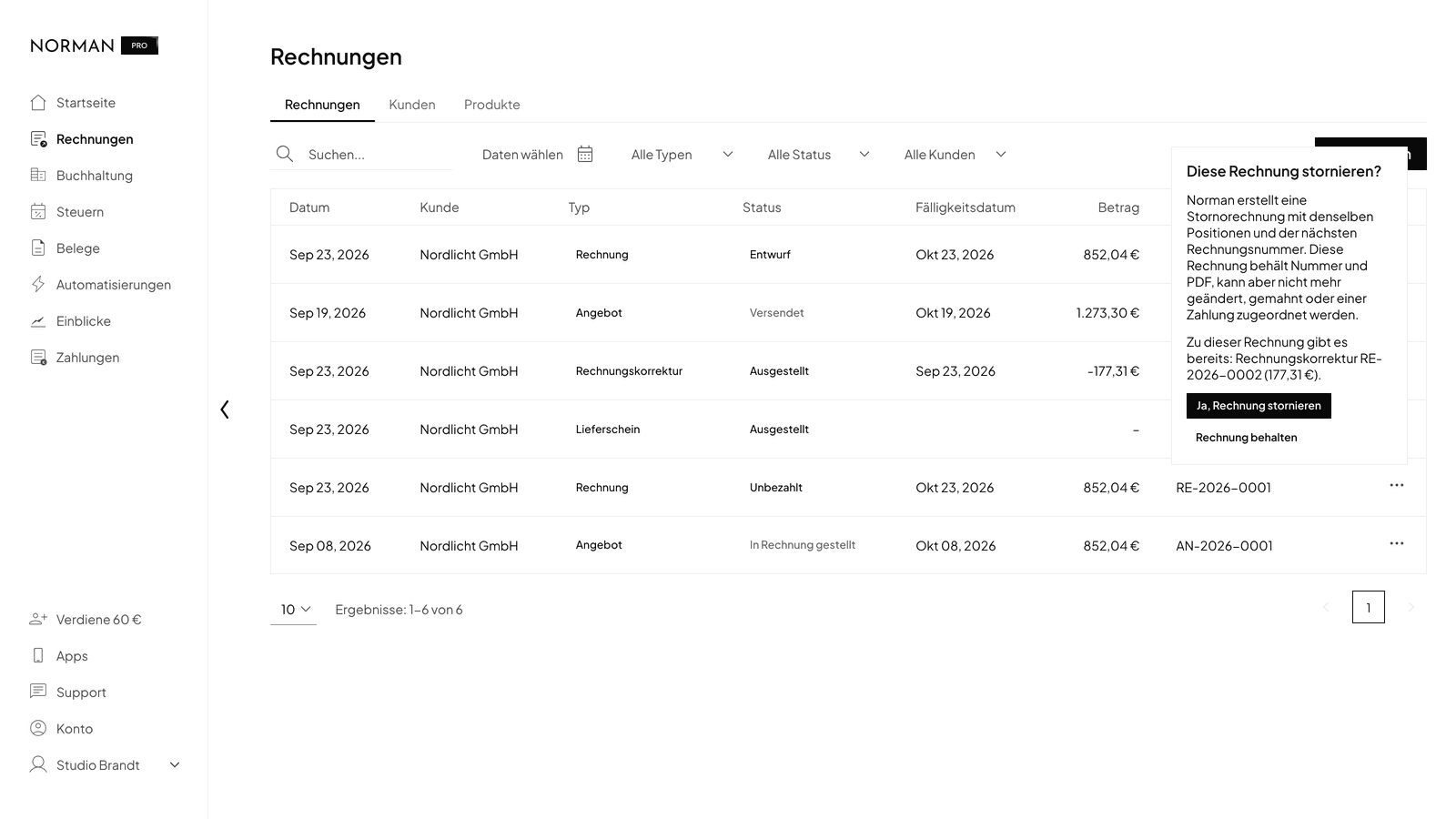
Norman issues the cancellation invoice at once:
- It has the same lines as the invoice, today's date and the next invoice number.
- The PDF carries the title Cancellation Invoice. The Reference row reads, for example, "Cancellation of invoice RE-2026-0007 dated Sep 12, 2026".
- Every amount prints with a minus. No due date prints.
The original invoice then shows Cancelled. It keeps its number and its PDF, but it is read-only:
- You can no longer edit it, mark it as paid or send it by email.
- Norman sends no more payment reminders for it.
- Norman no longer matches a payment to it.
More rules:
- An invoice has only one cancellation invoice. After that, Create cancellation invoice is gone from the menu.
- You can delete neither the cancellation invoice nor the cancelled invoice.
- Norman does not send the cancellation invoice on its own. Open its menu and choose Send by email.
Bill again after a cancellation
If you then need a correct invoice, open the menu of the cancelled invoice and choose Duplicate. Norman creates a draft with the same client, the same lines and the next invoice number. Correct the draft and issue it.
Cancel a paid invoice
You can cancel a paid invoice too. If you pay the money back to your customer, mark the repayment in your bank account with the switch Is it a refund?. The steps are in Record refunds with the refund switch.
Create a credit note
A credit note reduces an invoice by a part. The invoice itself stays valid and keeps its status.
- Open the menu of the issued invoice and choose Create credit note.
- Norman creates a draft with all lines of the invoice and opens it in the editor.
- Change the lines so that only the part by which the invoice goes down remains. Enter positive amounts.
- Click Next and then Issue credit note.
An example: you charged 10 hours, but you worked 8. Keep one line with 2 hours at the same rate and delete the other lines.
If the invoice already has a credit note, Norman first asks Create another credit note? and names the existing ones. Click Yes, create a credit note to go on. One invoice can have several credit notes.
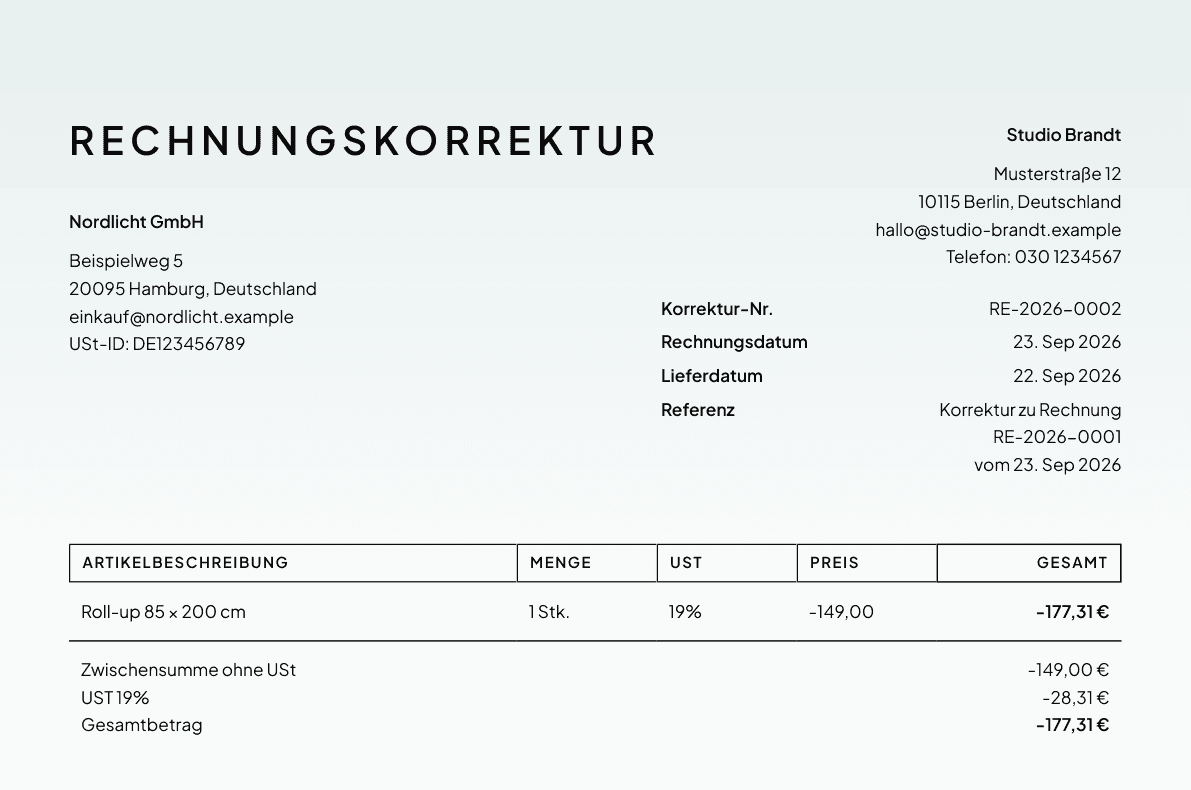
The PDF carries the title Credit note. The Reference row reads, for example, "Correction of invoice RE-2026-0007 dated Sep 12, 2026". The credit note takes a number from the sequence of your invoices.
Payments after a credit note
Norman detects a payment automatically only when it equals the invoice amount exactly. If your customer pays the reduced amount after the credit note, match the payment to the invoice by hand. Read Invoice status, drafts and payments.
If your customer already paid the full amount and you pay the difference back, mark the repayment with the switch Is it a refund?.
Why Norman does not say Gutschrift
In German, people often call a credit note a Gutschrift. Under § 14 (2) UStG, however, a Gutschrift is an invoice that your customer issues for you. Norman's German interface therefore calls your document a Rechnungskorrektur.
Without the original invoice in Norman
Open Invoices, click Create and choose Cancellation invoice or Credit note. This creates a document without a link, for example for an invoice from your old software. Enter the amounts as on the original invoice, without a minus. Under Cancels invoice or Corrects invoice, enter the number and date of the original invoice. Norman prints them under Reference and adds them to the e-invoice.
In the e-invoice
A cancellation invoice and a credit note get an e-invoice like any invoice. The data set names the number and date of the original invoice, also when you enter them yourself. More in Create, send and receive e-invoices.
Related documents
In the details of the invoice, Related documents lists its cancellation invoice and its credit notes. In the details of a cancellation invoice or credit note, Made from shows the invoice. A click opens the document.
Related articles
Norman handles the operational finance work
Invoicing, receipts, bookkeeping, and taxes in one workflow: start for free.