
Record refunds with the switch "Is it a refund?"
Money back from a supplier or money back to a customer: mark the bank transaction as a refund instead of creating a transaction with a negative amount.
Updated
A refund is money that reverses an earlier booking: a supplier pays you back, or you pay a customer back. In Norman you mark the real bank transaction with the switch Is it a refund?. You do not create a transaction with a negative amount.
How to mark a refund
- Open Bookkeeping and click the transaction.
- In the Booking section you find the switch Is it a refund?. Switch it on.
- Norman shows you what happens: the transaction moves to the other side of your books. Click Switch.
- Check the category. A supplier refund belongs in the same expense category as the original purchase. A customer refund belongs in the income category of the original sale.
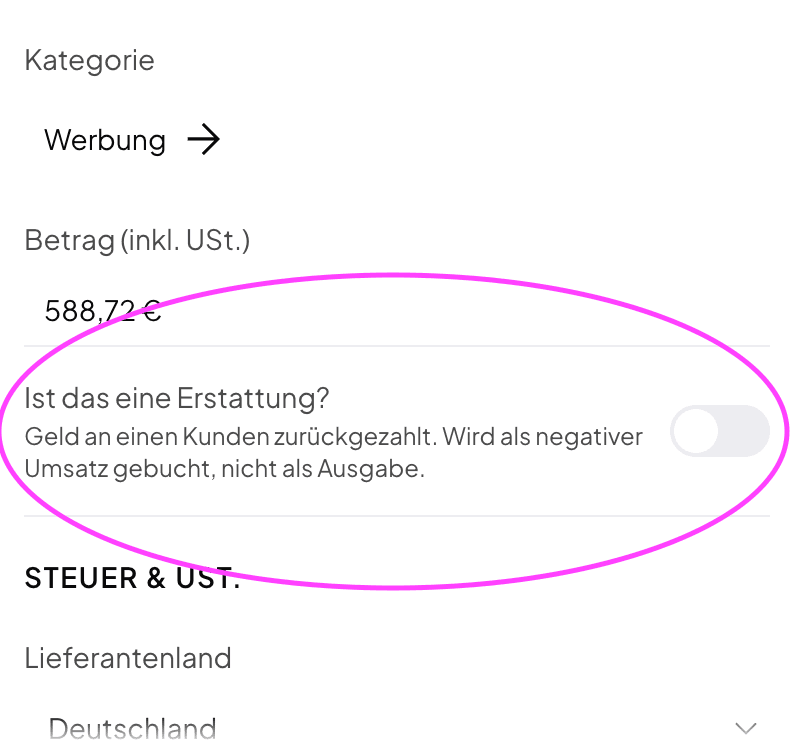
In the iPhone and Android app you find the switch when you create or edit a transaction.
What the switch does
| Case | Bank movement | Booked as | Effect in the reports |
|---|---|---|---|
| A supplier pays you money back | Money comes in | Expense with a minus | Reduces the expense category and the input VAT. Does not count as revenue |
| You pay a customer money back | Money goes out | Income with a minus | Reduces your revenue and the output VAT. Does not count as an expense |
The amount stays as the bank shows it. The VAT rate of the transaction also applies to the refund. Norman nets the refund in every report: EÜR, UStVA, annual VAT return, BWA and DATEV export. For UG and GmbH the ledger books the refund as a reversing entry on the same accounts.
Partial refunds work the same way. The amount is what actually came back.
If you pay money back to a customer after a cancellation invoice or a credit note, you record it the same way with the switch. Read Cancel or correct an invoice.
The right category
When you switch, the transaction keeps its category if it fits the new side. If it does not fit, for example an income category on a supplier refund, Norman removes the category and you choose a new one. Norman warns you before the switch.
Undo a refund
Switch Is it a refund? off and confirm. The transaction goes back to the side that matches the bank movement: money in becomes a normal income again, money out a normal expense again.
Finalized transactions
On a finalized transaction the switch is locked. Unfinalize the transaction, switch the booking, and finalize it again. If you already filed the UStVA for the period, read Correct a submitted UStVA.
What is not a refund
The switch is only for money that reverses a business purchase or a business sale. Leave it off for:
- Payments from or to the Finanzamt, for example a VAT refund after the UStVA. Use the tax categories for those.
- Transfers between your own accounts. Use Internal transfer for those.
- Private payments. Use Personal for those.
Do not create negative amounts
If you recorded a refund earlier as a manual transaction with a negative amount, delete that manual entry and mark the real bank transaction with the switch instead. Your reports and your bank then match.
Related articles
Norman handles the operational finance work
Invoicing, receipts, bookkeeping, and taxes in one workflow: start for free.