
Bank accounts, imports, and manual transactions
How to connect bank accounts and add bookkeeping records by CSV, PDF, DATEV, or manual transaction.
Updated
Bank sync and plans
Bank sync is generally available with a paid plan. The Free plan does not normally include bank sync.
Some accounts can connect one bank account on the Free plan as part of a promotion.
Paid plans support up to five connected bank accounts.
Sub-accounts within the same bank usually do not count separately. In rare cases, the bank interface can still treat sub-accounts as separate connections.
Add bookkeeping records without bank sync
You can use Norman for bookkeeping without bank sync. Create single transactions manually or import several bookkeeping records from a file.
Norman supports these import sources:
- CSV files, such as exported bank transactions
- PDFs that contain transaction or bookkeeping data
For a GmbH or UG's DATEV booking stack or opening balances, use Accounting → Setup → Opening & migration. Do not interpret a double-entry booking stack as a bank statement through the transaction import below.
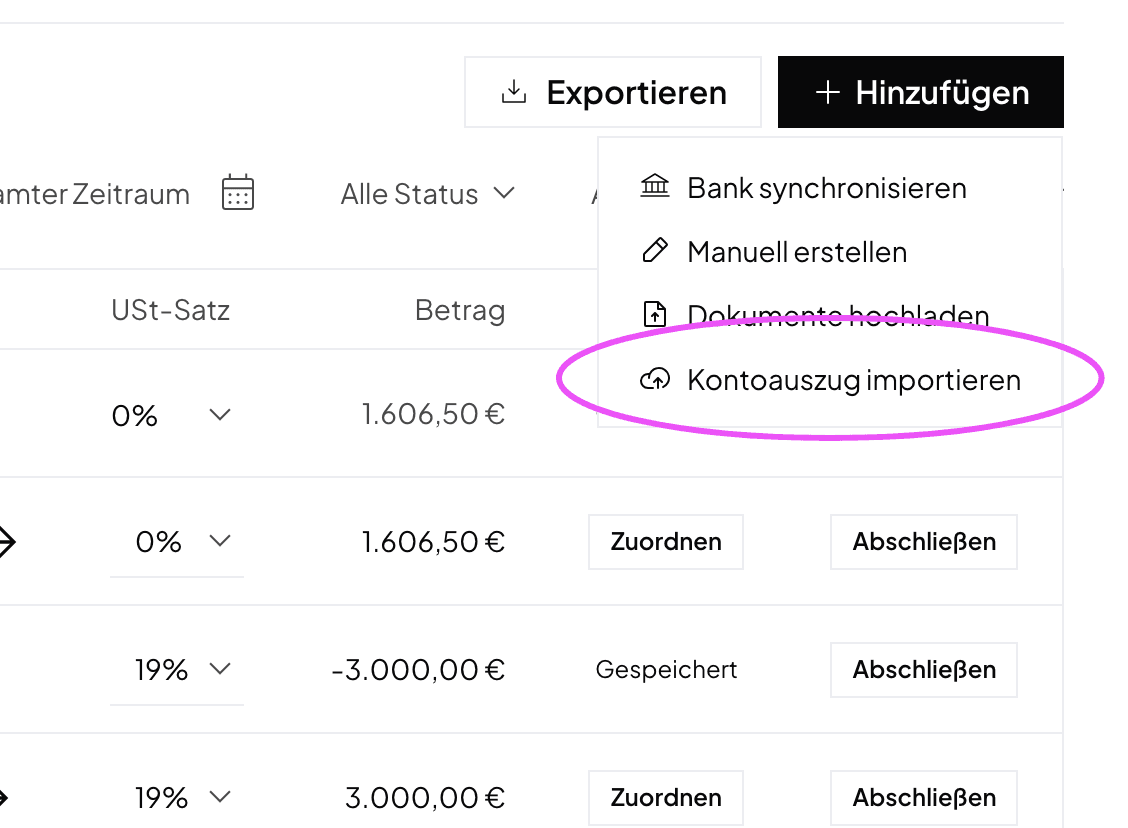
To start an import:
- Open Accounting.
- Select + Add.
- Select Import statement.
- Upload your file and review the detected records before you save them.
Add a booking by hand
- Open Accounting.
- Select + Add, then Create manually.
- Fill in the details and click Add booking.
A new booking starts as paid: the Payment type is Bank, and the Payment date follows the booking's date. If you paid another way or on another day, change both.
If the booking is not paid yet, choose Not paid as the Payment type. It is then an open booking, and you mark it as paid later. Read Mark open bookings as paid.
If you add the booking from a document with Add booking, it starts as Not paid. Its bank payment takes it over later.
Stripe, PayPal, and Shopify
You do not need to import a file for Stripe. Connect Stripe through the integration, and Norman will import your Stripe transactions automatically.
You connect PayPal like a bank, through bank sync. See Connect PayPal and Wise. For Shopify, check the connection options under Integrations. Review the scope shown for the provider before connecting. If you use a file instead, avoid importing a period already covered by a connection.
File import and manual entry also work for:
- Cash payments
- Other payment providers and merchant-of-record providers
- Bank accounts you do not want to connect
After the import, attach the matching receipt or invoice as a PDF or image to each transaction. Before you save, check that Norman detected the data correctly and that the record does not already exist.
Connect an ING business account
If your ING business account is not listed separately, choose ING in the bank connection flow. On the ING page, you may need to scroll down and choose the business customer login option.
Pay a supplier invoice
To initiate a transfer from Norman, use Payments with a bank account that supports payments. A connection for transaction synchronization alone may not provide this capability. Read the Bill Payment overview, then follow the web and mobile payment guide.
Cash activity and the company Ledger
Record cash activity through manual transactions with the correct payment account. GmbH and UG users can review cash movements and a running balance in Ledger → Cash book. See the company Ledger guide.
Norman handles the operational finance work
Invoicing, receipts, bookkeeping, and taxes in one workflow: start for free.