
Tax advisors: changes since the last DATEV file
Norman shows you which documents and bookings of a client changed since your last DATEV file. One click downloads only the changes or the whole period again.
Updated
As a client's tax advisor, you see in Norman what changed since your last DATEV file: new documents, and new, changed and removed bookings. So you know when to take a period into DATEV again.
Which DATEV file counts as the last one
Norman keeps track of each DATEV file of a period that reached you:
- your download in DATEV format, or the download of another tax advisor of the client
- the email with the export to you
- the push to DATEV
For each period, Norman compares the books with the newest of these files. When your client downloads a DATEV file themselves, the comparison stays the same.
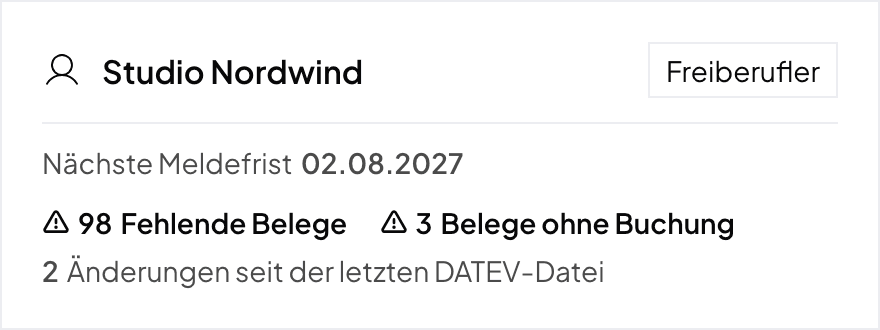
The count in the client list
Under My clients, the card of a German client shows how many changes there are since the last DATEV file. The count covers all periods you already have as a DATEV file.
The changes in the export panel
- Open the client from the client list.
- Open Accounting and click Export. For a GmbH or UG, open Accounting → Ledger (Hauptbuch) → Journal and click Export DATEV.
- For each changed period, a block shows above the download options, for example "Since your download of September 2026 on October 28, 2026".
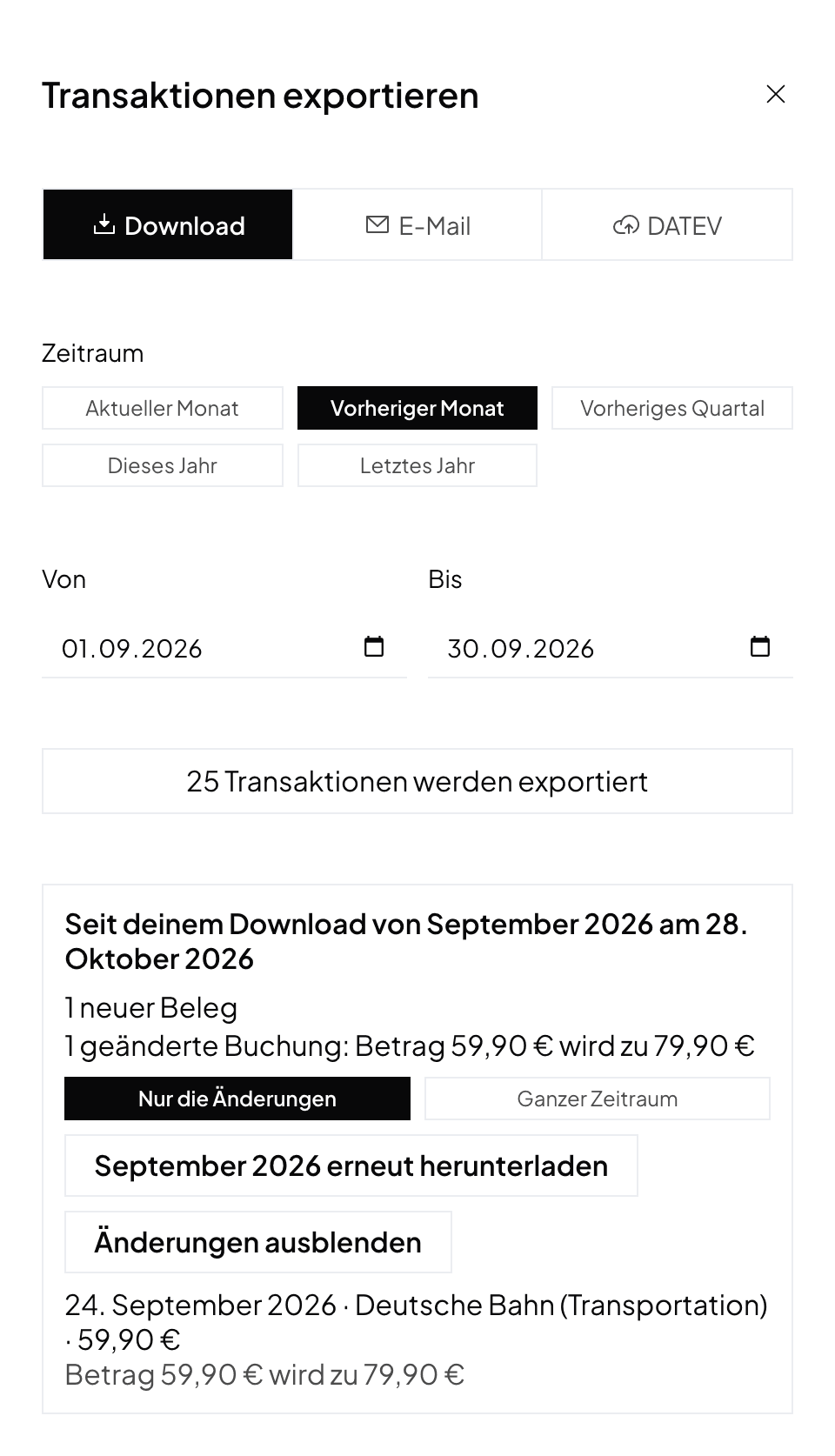
The block names:
- New documents: documents dated in the period that your file does not hold. They were uploaded after your file, or newly attached to a booking. "1 of them without a booking" counts the documents that have no booking yet. Documents without a date belong to no period.
- New bookings: bookings that belong in the period's DATEV file today but are missing from your file.
- Changed bookings: bookings whose line in the DATEV file looks different today, for example with another amount, account or document. If there is exactly one change, it shows right in the line.
- Removed bookings: bookings from your file that were deleted, are no longer finalized, or moved to another period.
For a GmbH or UG, the journal shows the periods of the selected year.
Download the period again
In the block, choose what the file holds and click Download … again, for example Download September 2026 again. Norman uses the panel's settings.
- Only the changes (selected first): a reversal with Generalumkehr for each line of a changed or removed booking, then each new and each changed booking, with their documents. Your earlier import in DATEV stays.
- Whole period: the DATEV file of the whole period.
The choice shows when bookings changed. After that, the block goes away until something changes again.
Send to DATEV again
When you send a period to DATEV that DATEV already has, Norman asks: Send only the changes sends the same lines as a new batch. Send the whole period sends the whole period again and doubles the bookings DATEV already has.
Who sees the changes
Only the client's tax advisors see the block and the count, and only for companies in Germany. Your client does not see them.
Norman handles the operational finance work
Invoicing, receipts, bookkeeping, and taxes in one workflow: start for free.