
Set up the employer step by step
Betriebsnummer, Berufsgenossenschaft, contact person and levies: what payroll needs, where to find it and what saving does.
Updated
Before you calculate your first month, record your company's details as an employer once. You find them in Payroll on the Employer tab.
The documents you need
| Detail | Where it comes from |
|---|---|
| Betriebsnummer (8 digits) | Letter from the Betriebsnummern-Service of the Bundesagentur für Arbeit. Don't have one yet? Apply there for free before you register your first person. |
| Berufsgenossenschaft and its Betriebsnummer | Membership notice from your Berufsgenossenschaft (statutory accident insurer) |
| Unternehmensnummer (15 digits) | The same membership notice; the DGUV explains where it is printed |
| U1 and U2 levy participation | Notice or Satzung of the health fund |
The form links to the Betriebsnummer application at the Bundesagentur für Arbeit and to the Unternehmensnummer explanation at the DGUV.
1. Check the company details
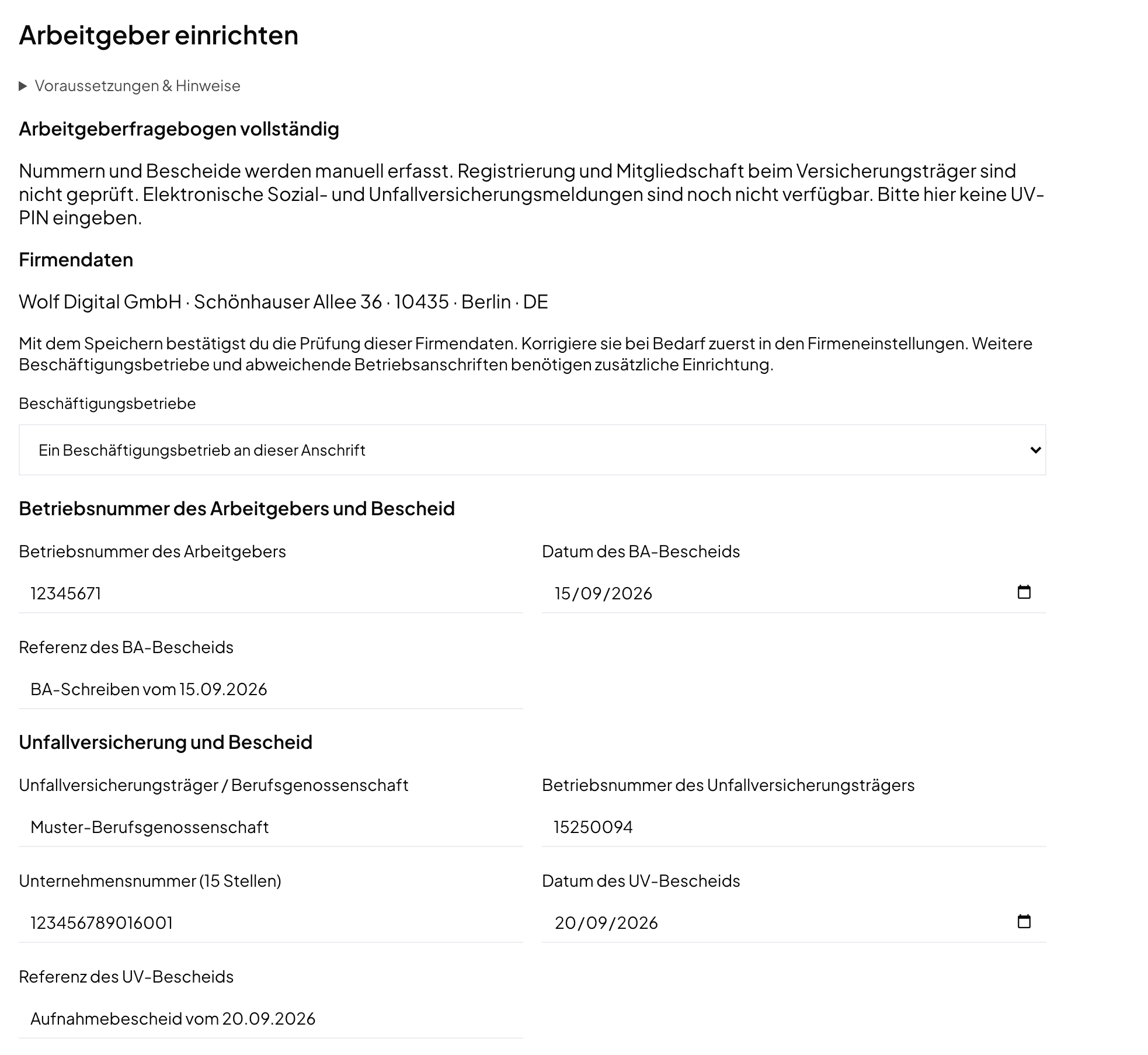
At the top, Norman shows the company name and address from the company settings. If something is wrong, correct it there first. Saving confirms that you checked these details.
For the Lohnsteuer-Anmeldung, the company also needs its Steuernummer and federal state. You keep both in the tax settings of your account, not on this tab.
2. Choose the establishment
Under Establishment structure, choose One establishment at this address. Payroll supports one establishment in Germany at the company address. Several establishments or a different establishment address cannot be set up.
3. Enter the Betriebsnummer
Under Employer Betriebsnummer and notice, enter three details:
- the Employer Betriebsnummer;
- the BA notice date;
- a BA notice reference, for example the date or reference of the letter.
Norman checks the Betriebsnummer's check digit.
4. Enter the accident insurance
Under Accident insurance and notice, enter:
- the Accident insurer / Berufsgenossenschaft, for example the Verwaltungs-Berufsgenossenschaft;
- the Accident insurer Betriebsnummer;
- the Unternehmensnummer (15 digits);
- the notice date and notice reference.
Your Berufsgenossenschaft PIN does not belong here. Norman never asks for it.
5. Name a contact person
Under Payroll contact, enter the first and last name, email and phone of the person who answers payroll questions. That is usually you.
6. Choose the levies
Under Levies and reimbursement (AAG), choose under Levies this employer pays:
| Option | For whom | What follows |
|---|---|---|
| Incapacity and maternity (standard) | employers with up to 30 employees: U1 and U2 | U1 reimbursement rate from the fund's Satzung, reimbursement of employer contributions, notice or Satzung reference |
| Maternity only | larger employers: U2 only | no further fields |
Take the U1 reimbursement rate from the fund's Satzung (%) from your health fund's notice or Satzung; it is between 40 and 100 percent. Under How the fund reimburses employer social-insurance contributions, choose how the fund reimburses them: with the wage, as a flat surcharge, or not at all. The levy rates themselves go into each person's SV details later.
7. Save
Choose Save employer details. Once everything is there, the top reads Employer questionnaire complete. If something is missing, Items to review lists each open detail. You can also save an incomplete draft and finish it later.
Every save creates a new version. You see earlier versions under Employer detail history. Months you already approved stay as they are.
What saving does not do
Saving does not register you anywhere. The message No registration was sent means exactly that. Norman records the numbers, but it does not check them with the Bundesagentur, the Berufsgenossenschaft or a health fund. You must have applied for the Betriebsnummer and the membership yourself.
You also need the Betriebsnummer for the SV-Meldeportal and to pay health funds from Norman. Next step: Add people.
Norman handles the operational finance work
Invoicing, receipts, bookkeeping, and taxes in one workflow: start for free.