
Example: your first three payroll months, October to December
A GmbH starts running payroll, hires someone in November and raises a salary in December. Month by month, with every deadline.
Updated
This example walks through three months of payroll from the very start. The figures are made up; Norman calculates your taxes and contributions from your real data.
The setup
Wolf Digital GmbH in Berlin runs payroll in Norman from October 2026.
| Person | Role | Insurance | Gross |
|---|---|---|---|
| Jana Wolf | Managing director and controlling shareholder | exempt from social insurance, privately insured | €6,000, from December €6,500 |
| Max Becker | Software developer from 16 November | statutory insurance | €4,200 |
The company's wage tax is well above €5,000 a year, so it files the Lohnsteuer-Anmeldung monthly.
Before: set up once
- Under Employer, Jana enters the Betriebsnummer, the Berufsgenossenschaft and herself as the contact. As levies she chooses Incapacity and maternity (standard), because the company has fewer than 30 employees. See Set up the employer.
- Under People, she adds herself with Add director. She enters €6,000, valid from 1 October 2026, and her tax details. As insurance profile she picks No social insurance (beherrschender GGf) and Private (PKV) with her monthly premium.
- She registers the company in the SV-Meldeportal, with the company's ELSTER organisation certificate from Mein Unternehmenskonto and the Betriebsnummer. She doesn't need the portal in October, but she will from November.
October: only the director
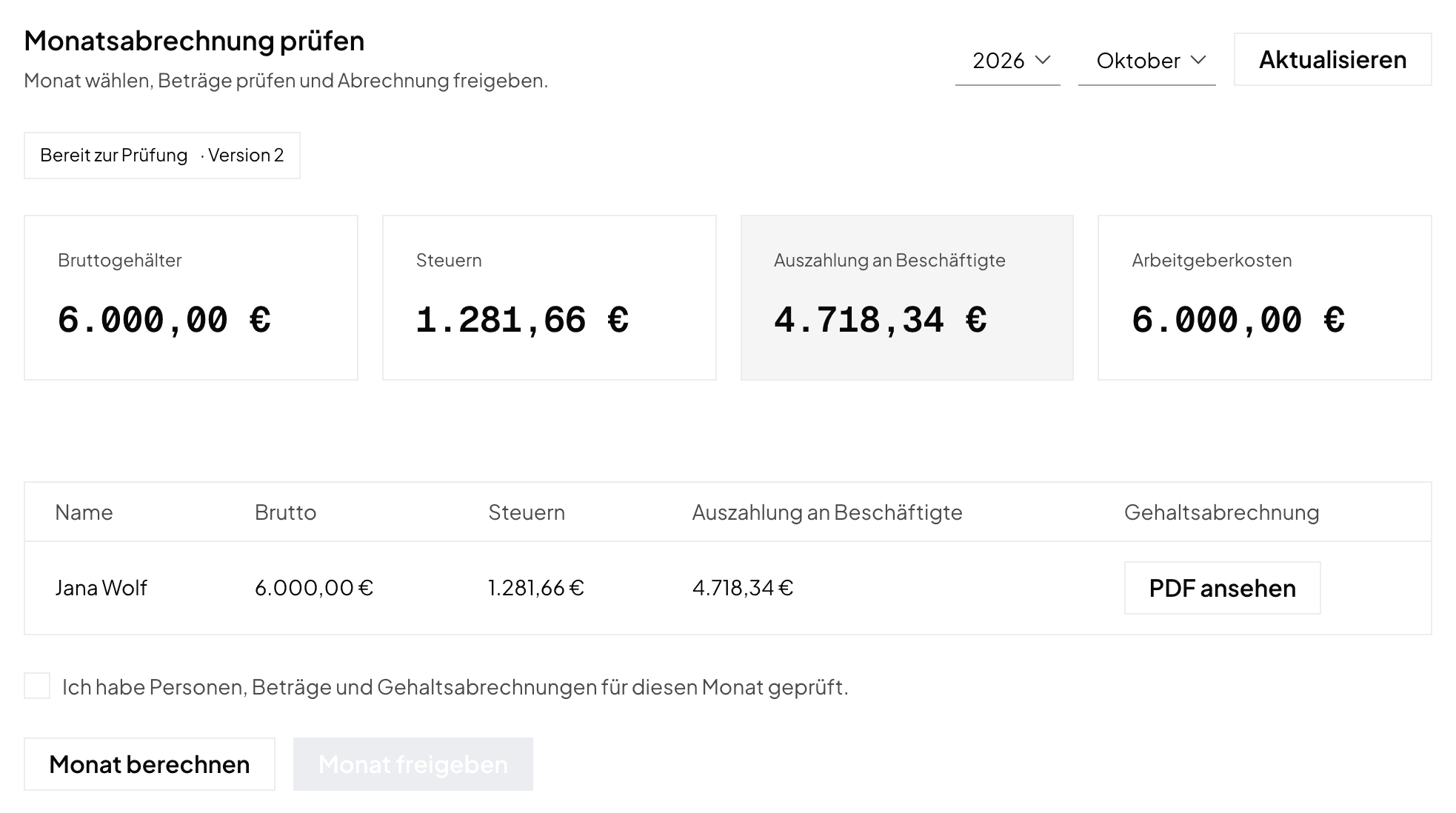
- Under Payroll, Jana selects October 2026 and Calculate month. The review shows one line with €6,000 gross, her taxes and the payout. There is no social insurance.
- She checks the figures and the payslip, ticks I have checked the people, amounts and payslips for this month and chooses Approve month.
- Under Tax reports, she picks the period 10 · October, then Compute, the ELSTER test preview and Submit Lohnsteuer-Anmeldung. The deadline is 10 November.
- With Pay the month, she transfers her net salary and the wage tax in one order. She can also untick the wage tax and pay it later with an execution date up to 10 November.
There is nothing to do in the SV-Meldeportal in October: nobody is subject to social insurance yet.
November: Max starts on the 16th
Add Max. Under People, Jana chooses + Add employee and enters:
- €4,200, valid from 16 November 2026, and Actual calendar days under Partial-month salary;
- his tax ID, date of birth, address and IBAN.
Then she completes his profile:
- SV details effective 16 November, with his health fund, the fund's Betriebsnummer and Zusatzbeitrag, and the levy rates;
- the Personnel questionnaire with his activity code and pension insurance number;
- the Work schedule with Monday to Friday at 8 hours;
- the Vacation entitlement with the 28 days from his contract.
See Add people.
Register. Under Prepare registration, Jana saves the reviewed preparation and copies the details into the SV-Meldeportal (reason code 10). That can go with the November payroll, and at the latest six weeks after 16 November.
Run the month. November has 30 days, and Max is employed for 15 of them. Norman prorates his salary: €4,200 × 15 / 30 = €2,100 gross. His wage tax and contributions follow from this partial month. Jana calculates, checks and approves the month before the Beitragsnachweis is due.
Report and pay contributions.
- Social contributions → shows the contributions for Max's health fund.
- Jana sends the Beitragsnachweis through the SV-Meldeportal. It must reach the fund by 0:00 on 24 November, so by 23 November at the latest.
- The contributions must reach the fund's account by 26 November.
- Had the month not been approved by then, she would save a contribution plan and report and pay its estimate.
Pay and file.
- With Pay the month, Jana's and Max's net salaries and the health fund contributions go out as one transfer.
- She files November's Lohnsteuer-Anmeldung by 10 December and pays the wage tax by then.
December: a raise and vacation
Raise. The shareholders' meeting raises Jana's salary to €6,500 from December. Jana opens her profile, chooses Salary schedule and enters:
- Change effective month: December 2026;
- New monthly gross (EUR): 6,500.
Save salary change records it. Salary changes always take effect from the 1st of a month. October and November stay as approved.
Vacation. Max takes vacation from 21 to 23 December. Under Absences, Jana records Paid vacation. His salary does not change, and the days count against his entitlement.
Run and report.
- Jana calculates December: her line shows €6,500, and Max's line his full salary of €4,200.
- She approves the month, sends the Beitragsnachweis and pays the contributions. Because of the holidays, December's dates come earlier; the health funds publish them in their due-date calendar.
- December's Lohnsteuer-Anmeldung is due on 11 January 2027, because 10 January is a Sunday.
After the new year
- By 15 February 2027, Jana sends the annual report for Max (reason code 50) through the SV-Meldeportal.
- The 2026 wage tax certificates (Lohnsteuerbescheinigung) for both must be transmitted by the end of February 2027. Norman prepares them for review but does not transmit them yet. Plan the transmission in time, for example with your tax advisor.
What Jana does every month
Update People → calculate and approve the month → Beitragsnachweis through the SV-Meldeportal → Pay the month → file wage tax. The deadlines are in the overview at Payroll in Norman: start here.
Norman handles the operational finance work
Invoicing, receipts, bookkeeping, and taxes in one workflow: start for free.