
Add people: directors and employees
Salary, tax and insurance details, SV details, personnel questionnaire and work schedule: how to add each person and prepare the registration for the SV-Meldeportal.
Updated
Add every person you pay in Payroll on the People tab:
- Add director for yourself or other managing directors;
- + Add employee for each employee.
Set up the employer first.
What you need per person
| Detail | Where it comes from |
|---|---|
| Monthly salary, start date, working hours, vacation days | Employment contract |
| Tax ID, date of birth, address | The person |
| Tax class, child allowances, church | Electronic wage tax deduction features (ELStAM). Norman does not retrieve them itself. Take them from the ELStAM notice you get through ELStAM-capable payroll software or your tax advisor, or from a tax office certificate. |
| IBAN | The person |
| Health fund, its Betriebsnummer and Zusatzbeitrag | The person's membership certificate; the fund publishes its Betriebsnummer and Zusatzbeitrag |
| Pension insurance number | Social insurance card or a letter from the pension insurance |
| Activity code (Tätigkeitsschlüssel, 9 digits) | Directory of the Bundesagentur für Arbeit, linked in the form |
Managing directors who are exempt from social insurance need no health fund, pension insurance number or activity code.
1. Add the salary
Both buttons open the Add salary form:
- Display name, Monthly gross salary and Tax class (1 to 6). Tax class IV with a factor is not supported.
- Valid from is the start date. Enter a Last day of employment only for a fixed-term or ended contract.
- Partial-month salary: if the employment starts or ends mid-month, choose Actual calendar days. Norman then prorates the salary by calendar days.
- First name, Last name, Tax ID (11 digits), Date of birth and the address. They are required for employees and optional for directors.
- IBAN, BIC and Account holder: where Norman transfers the net pay when you pay the month from Norman. You can add the IBAN later too.
- Church tax: None, Protestant (EV) or Roman Catholic (RK), with a Church tax rate of 8 or 9 percent depending on the federal state.
- Child allowance factor, for example 0.5 or 1.
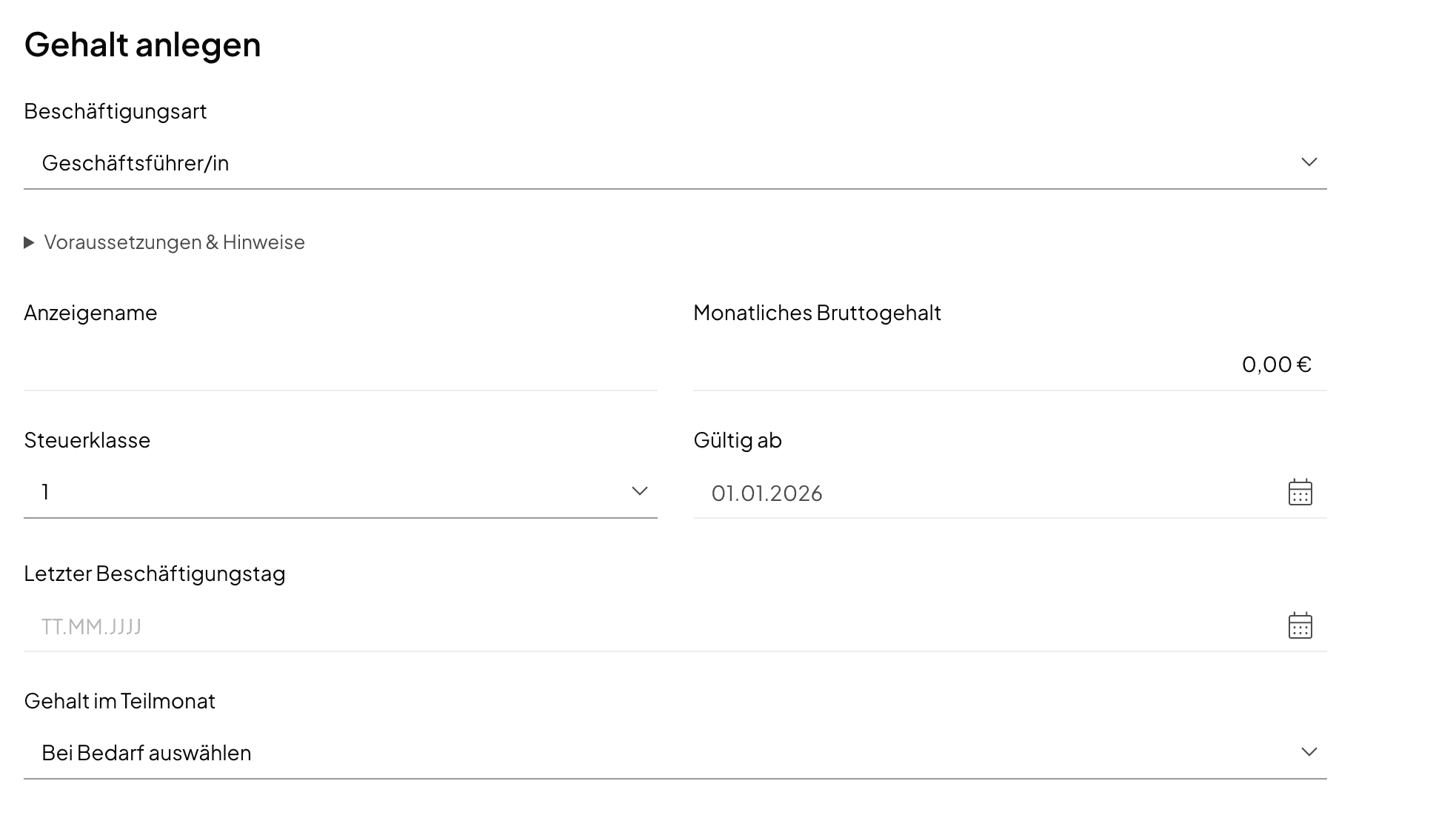
Choose Add salary. The person appears in the list. Use Open profile → to add the remaining details.
2. Managing directors: the insurance profile
Under Insurance profile there are two options:
| Profile | For whom |
|---|---|
| Statutory health insurance | Managing directors who are employed subject to social insurance. Then record the SV details as for employees. |
| No social insurance (beherrschender GGf) | Controlling shareholder-directors who are exempt from social insurance |
With the second profile, choose the health insurance:
- Private (PKV) with the monthly premium;
- Voluntary statutory (freiwillig GKV) with the Fund's Zusatzbeitrag (%) and the children under 25 or the childless surcharge for care insurance.
The choice decides the wage-tax allowance for insurance (Vorsorgepauschale), so pick the one you actually have. Leave the employer subsidy fields for private health and care insurance empty: a month with a subsidy cannot be approved.
Whether you are exempt from social insurance depends on your shares and voting rights. If in doubt, a status determination by the Deutsche Rentenversicherung settles it.
3. Employees: complete the profile
Open the person's profile. For employees, fill in four sections before you calculate the first month.
SV details. Under Record insurance details:
- Effective from date: the 1st of a month or, for new employees, the start date;
- Health insurance fund and Health fund establishment number;
- Additional health rate (%) and U2 levy rate (%);
- if the employer takes part in U1, the U1 levy rate (%);
- the childless care surcharge, or the children under 25 eligible for the care discount;
- Place of employment in Saxony;
- Evidence / reference and the Source.
Confirm the standard case and choose Save SV details.
Personnel questionnaire. It covers nationality, birth surname, place and country of birth. It also covers the Job title, the Activity code (9 digits) and the Weekly working hours. Add the Pension insurance number with its source. If the person has none yet, the pension insurance assigns one after the registration; you then add it with the source External DSRV notice (recorded manually). Choose Save questionnaire.
Work schedule. Enter the contractual hours per weekday, with Effective from and a contract reference. For a five-day week, Fill Monday–Friday with 8 hours helps. The schedule counts vacation and sick days; without it, no absences can be recorded.
Vacation entitlement. Enter the Agreed days per year from the contract and confirm you checked them.
4. Prepare the registration and send it in the SV-Meldeportal
Register every new employee with their health fund (reason code 10). Do this with the next payroll, at the latest within six weeks of the start date.
- In the profile, open Prepare registration. Norman collects the details from the employer data, the personnel questionnaire and the SV details.
- When it reads Information complete for handoff, confirm the review and choose Save reviewed preparation.
- Download the preparation as a PDF and copy the details into the SV-Meldeportal. Check the person group and contribution group yourself; for employees in full-time or part-time work with full insurance they are usually 101 and 1111.
Norman does not send the registration itself. How the SV-Meldeportal works: Send social insurance reports in the SV-Meldeportal.
Limits
Norman runs payroll for employees only on a fixed monthly salary with full statutory insurance. The salary must be more than €603 and up to €6,450 gross a month (2025: more than €556 and up to €6,150). Up to €2,000 the transition zone applies (Midijob): Norman calculates the contributions from the reduced bases, so the employee pays less and the employer more. Up to €603 (2025: €556) Norman runs the person as a minijob with the flat charges to the Minijob-Zentrale. A contract that ends after four weeks or less cannot be run. Multiple employment, hourly wages and one-off payments are not covered.
Later changes such as a raise, a new tax class or a leaving date are recorded with a date and never change existing payroll. See Joiners, leavers and pay changes.
Once everyone is added, continue with the first month.
Norman handles the operational finance work
Invoicing, receipts, bookkeeping, and taxes in one workflow: start for free.