
Company details: NIP, address, PESEL and tax office
Where to fill in and change your company details in Norman: the NIP, EU VAT number, address, business email, PESEL, business start date, tax office, tax form, VAT status, ZUS profile and a company's register details, and how to add another company.
Updated
Your company details go on invoices, to KSeF, into the JPK_V7 file and into your returns. Fill them in before your first invoice or your first JPK. The home page shows a list of steps, and each one leads to the right field.
Update your details with the relevant authority separately. Changing them in Norman updates your records here; it does not notify the tax office, CEIDG or KRS.
Address and business email
Open Account → Personal:
- the JDG owner's first and last name: they go into the JPK_V7,
- the company address: a Polish postal code has the format XX-XXX, for example 00-842,
- Business email: it appears on invoices and in the JPK file. Without it, Norman uses the owner's account email,
- Account type, the legal form: for a Polish company it cannot be changed here (see below).
You cannot change the email address you log in with yourself: contact support.
NIP, PESEL and tax office
Open Account → Taxes, section Business details:
- NIP (tax identification number): 10 digits, without the PL prefix. From it Norman fills in the EU VAT number (NIP UE) (PL and the NIP) and checks your KSeF token.
- PESEL (JDG only): a sole trader's JPK_V7 and VAT-UE state the date of birth, which Norman reads from the PESEL. The annual PIT uses it too. Norman stores it encrypted, and only the company owner can see or change it. On saving, Norman checks the check digit and the date of birth.
- Business start date: as in CEIDG or the KRS. Norman creates your reports from it, from 2026 at the earliest. When you change it, Norman updates the open reports; filed ones stay as they are.
- Tax office (urząd skarbowy): search by town, name or code and choose it from the list. A JDG's office follows the owner's home address, a company's its registered office. Once chosen, Norman shows which office your JPK and annual returns name.
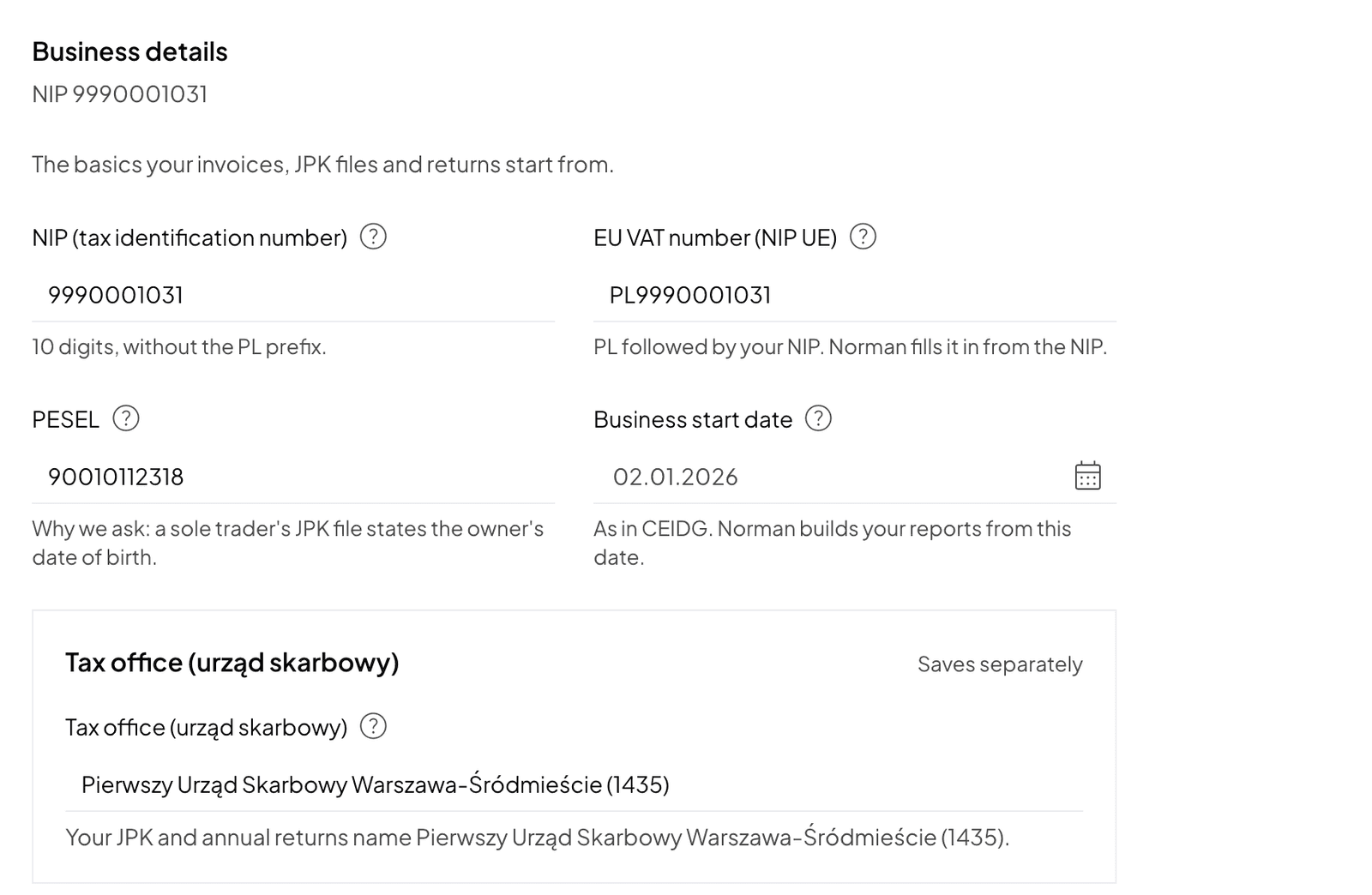
If the office was filled in automatically, you see a request to check it and a Confirm button. Norman does not prepare a JPK file until the office is chosen or confirmed. See Tax office: choose or confirm your office.
Tax form, VAT and ZUS
In the same Account → Taxes tab you also set:
- the Tax form in the Income tax (PIT) section, or for a company the CIT rate in the Corporate income tax (CIT) section,
- the VAT status and How often you settle VAT in the VAT section,
- your ZUS profile in the ZUS contributions section (JDG).
Choose them as you registered them with the tax office, CEIDG or ZUS: the settings in Norman report nothing. Details in Tax settings: tax form, VAT and JPK frequency and ZUS contributions and the DRA file.
A company's register details
An sp. z o.o. states its registered office, registry court, KRS number and share capital on invoices and business letters (art. 206 § 1 KSH). Fill them in under Invoices → Settings, section Business details: seat, registry court and department, KRS number, REGON and share capital. The KRS number has 10 digits including the leading zeros, the REGON 9 or 14 digits, and the share capital of an sp. z o.o. is at least PLN 5,000 (art. 154 § 1 KSH).
Legal form and another company
In Poland, Norman supports the JDG and the sp. z o.o. A JDG and a company are different taxpayers: once the company has books, for example an issued invoice, a bank operation or a document, you cannot change one form into the other. For a second business, add a new legal entity.
- Click the company name and choose Add legal entity.
- Answer the start questions for the new company.
You switch between companies with Switch company. Each company has its own reports and its own plan.
Switch to AI accounting with Norman
Connect KSeF and your bank, and your operations land in Norman by themselves. Norman prepares your returns from your documents, and you check them.