
ZUS contributions and the DRA file
Norman calculates a JDG's monthly social and health contributions, prepares the DRA as a KEDU file and the annual health contribution reconciliation. You send the DRA in eZUS or Płatnik.
Updated
For a JDG, Norman calculates the monthly ZUS contributions and prepares the DRA declaration. ZUS has no interface for filing from an app, so you send the DRA yourself in eZUS (PUE ZUS) or in the Płatnik program.
Check that your ZUS profile reflects your current insurance situation. If your circumstances need an individual calculation, review it with your accountant before filing.
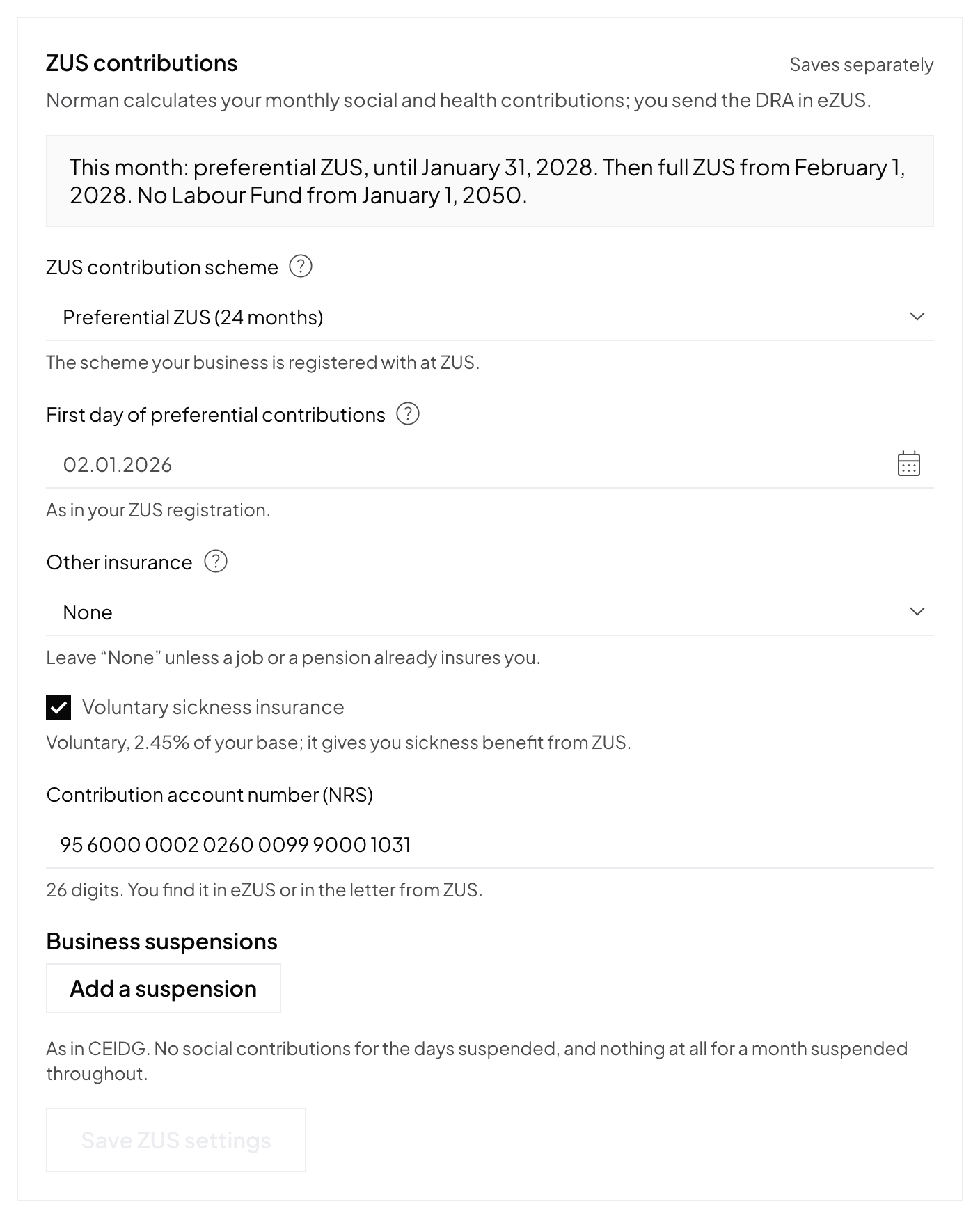
Set up your ZUS profile
Open Account → Taxes, section ZUS contributions (a shorter version is behind the Tax settings button on the Taxes page):
- the scheme: full ZUS, ulga na start, preferential ZUS or Mały ZUS Plus, as registered with ZUS;
- the scheme's start date: required for every scheme except full ZUS;
- Voluntary sickness insurance;
- Other insurance: an employment contract paying at least the minimum wage, or an old-age pension. You then pay only the health contribution from the business. A disability pension does not count;
- for Mały ZUS Plus: last year's revenue and income (or the declared base) and the months already used in the current 60-month period.
Click Save ZUS settings. Below the form you see this month's scheme and when the next one starts. Norman moves between schemes itself: after 6 months of ulga na start to preferential ZUS, after 24 months of preferential ZUS to full ZUS, and after the 36 months of Mały ZUS Plus to full ZUS.
The health contribution
- Tax scale: 9% of the previous month's income, at least the minimum contribution.
- Flat tax: 4.9% of the previous month's income, at least the minimum contribution.
- Ryczałt: an amount set by your revenue for the year.
The Labour Fund
The Labour Fund (Fundusz Pracy) is not due on the preferential base. It stops from the month after the owner turns 55 (women) or 60 (men). Norman reads the date of birth from the PESEL. Without a PESEL, enter your date of birth and sex in the ZUS settings. Without either, Norman charges the Labour Fund.
Business suspensions
Under Business suspensions, click Add a suspension and enter the dates as in CEIDG: Suspended from and Runs again from (leave it empty while the business is suspended).
- Suspended days owe no social contributions.
- A month suspended throughout owes nothing at all and has no DRA.
- A month suspended in part owes the full health contribution.
File the DRA
Enter your contribution account number once under Account → Taxes, section ZUS contributions, field Contribution account number (NRS). You find it in eZUS or in a letter from ZUS.
Then every month:
- On the Taxes page, open the ZUS DRA report for the month and check the contributions.
- Click Download KEDU file.
- Import the file in eZUS, in the ePłatnik application (or in the Płatnik program), check the DRA there, sign it and send it. Step by step: Importing the DRA into ePłatnik and paying ZUS.
- Pay the contributions in one transfer to your NRS by the 20th of the following month. The transfer details and a QR code for your banking app are on the report page, in the Pay contributions card.
- Click Mark as submitted. The reminders for this deadline stop.
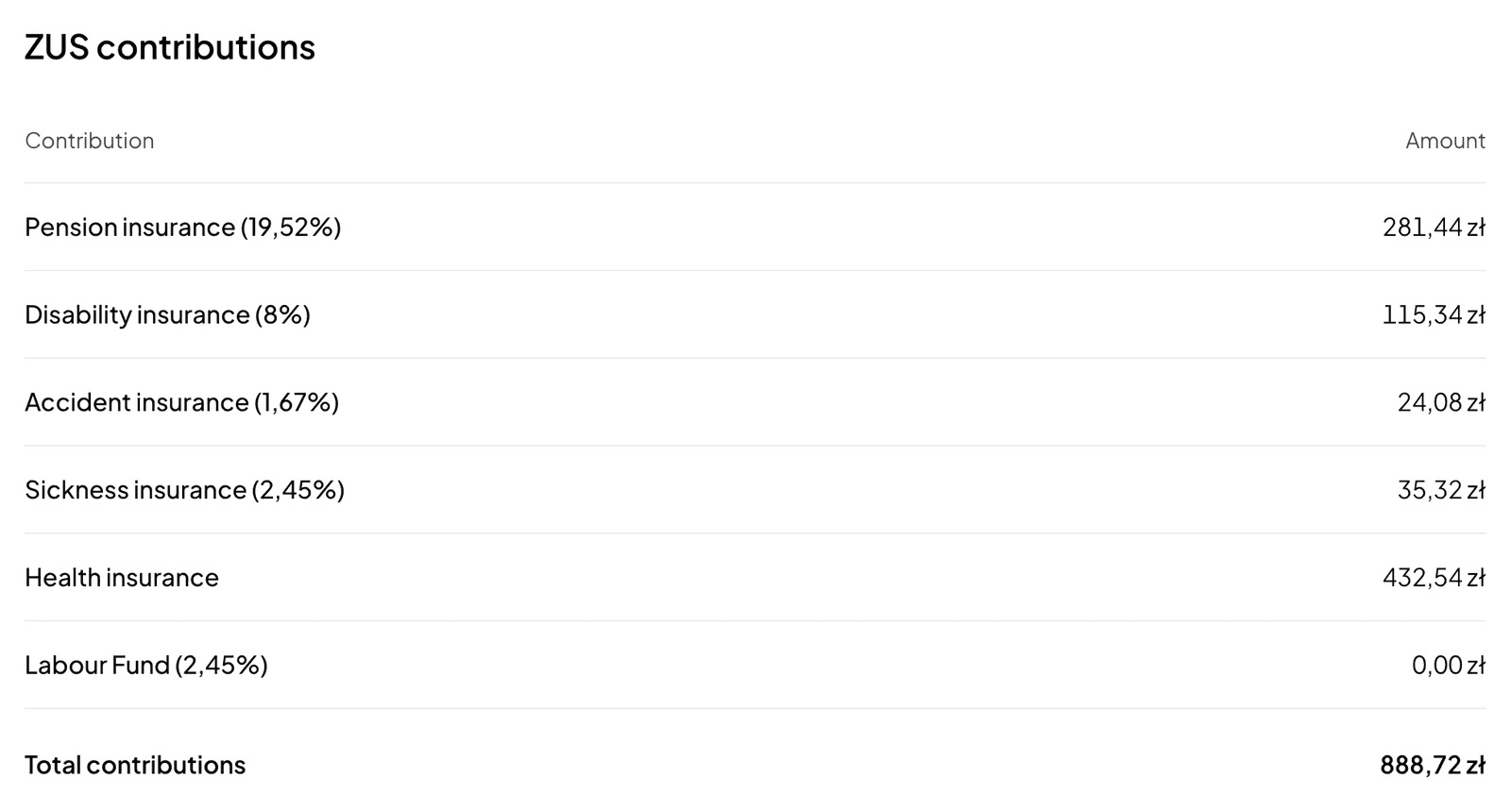
For the KEDU file Norman needs the NIP and the PESEL.
The annual health contribution reconciliation
The reconciliation for the previous year goes into the DRA for April. The report shows the annual health contribution, the sum of the monthly contributions and the difference.
- To pay: you pay it with April's contributions, in the April DRA.
- To refund: ZUS refunds an overpayment only on request. Send the RZS-R request that eZUS prepares after the DRA, within a month of the PIT filing deadline. Norman does not file it.
Norman does not reconcile a year whose earlier months were kept outside Norman, or years before 2026.
Switch to AI accounting with Norman
Connect KSeF and your bank, and your operations land in Norman by themselves. Norman prepares your returns from your documents, and you check them.