
German VAT Return (UStVA) 2026: ELSTER Guide, Calculation and Deadlines
You file the UStVA via ELSTER by the 10th after each month or quarter: revenue in fields 81 and 86, input VAT in 66, the amount due in 83. With a worked example, deadlines to April 2027, a letter template for the Finanzamt and what mistakes cost.
- Category
- Taxes
- Updated
- Author
- Diana Chebotareva
Key takeaways
- Deadline: the 10th day after the end of the month or quarter. If it falls on a weekend or public holiday, the next working day applies (§ 108 (3) AO). Payment is due the same day.
- Frequency in 2026: monthly with more than 9,000 € of VAT in the previous year, quarterly with 2,000 to 9,000 €, and up to 2,000 € the Finanzamt can exempt you (§ 18 (2) UStG).
- Fields: 81 (revenue at 19 %), 86 (revenue at 7 %), 66 (input VAT), 46, 47 and 67 (reverse charge from the EU), 83 (amount due). Revenue goes in net, in whole euros.
- Permanent extension (Dauerfristverlängerung): one extra month. Monthly filers pay a special prepayment of 1/11 of the previous year's prepayments (§ 47 UStDV).
- Paid late: 1 % surcharge per month started on the amount rounded down to the nearest 50 € (§ 240 AO). Filed late: a late-filing surcharge of up to 25,000 € at the Finanzamt's discretion (§ 152 AO).
- From 2027 founders file monthly again in the year they start and the year after, unless the exception is extended.
Who has to file, and how often?
Every business with VAT-taxable revenue files. The legal form does not matter: sole traders, freelancers, UGs and GmbHs follow the same thresholds. Small businesses under § 19 UStG charge no VAT and usually file no UStVA; when the Kleinunternehmer rule applies is explained in its own guide.
Your previous year's VAT, the sum of your amounts due, sets the frequency:
| VAT in the previous year | Reporting period | Legal basis |
|---|---|---|
| up to 2,000 € | Exemption possible, annual return only | § 18 (2) sentence 3 UStG |
| 2,000 to 9,000 € | Quarter (the standard case) | § 18 (2) sentence 1 UStG |
| more than 9,000 € | Month | § 18 (2) sentence 2 UStG |
| input VAT surplus above 9,000 € | Month if you choose, by 10 February | § 18 (2a) UStG |
Founders in 2026 and 2027. For 2021 to 2026, § 18 (2) sentence 6 UStG suspends the monthly filing duty for new businesses: your expected VAT, which you estimate in the tax registration questionnaire, decides, and most founders land in the quarterly cycle. There is no extension for 2027 so far (as of October 2026). If you start in 2027, the law has you file monthly in that year and the next.
Still monthly although you are below 9,000 €? The Finanzamt sets the period from last year's figures. If it keeps asking for monthly returns, a short letter is enough, for example as a free-text message in ELSTER. Write it in German:
Betreff: Voranmeldungszeitraum ab Januar 2027, Steuernummer [your tax number]
Sehr geehrte Damen und Herren, meine Umsatzsteuer für 2026 beträgt [amount] € und liegt damit nicht über 9.000 €. Ich bitte darum, ab Januar 2027 das Kalendervierteljahr als Voranmeldungszeitraum festzulegen (§ 18 Abs. 2 Satz 1 UStG). [If it is 2,000 € or less: Ich beantrage die Befreiung von der Abgabe der Voranmeldungen nach § 18 Abs. 2 Satz 3 UStG.]
Mit freundlichen Grüßen, [name]
It says: my VAT for 2026 is [amount] € and not above 9,000 €; please set the calendar quarter as my reporting period from January 2027 (and, where it applies, exempt me from advance returns).
How to calculate the UStVA: an example
Lena is a self-employed designer in Leipzig. She uses accrual accounting and files quarterly. In the third quarter of 2026 she has:
- design work for German clients, 18,000 € net (19 %)
- e-books sold to private buyers in Germany, 1,000 € net (7 %)
- Google Ads for 500 € net, billed by Google Ireland without German VAT (reverse charge, § 13b (1) UStG)
- a laptop for 1,500 € net and software and phone for 600 € net, each with 19 % VAT on proper invoices
| Field | What | Net amount | VAT |
|---|---|---|---|
| 81 | Revenue at 19 % | 18,000 € | 3,420.00 € |
| 86 | Revenue at 7 % | 1,000 € | 70.00 € |
| 46 / 47 | Services from EU businesses, § 13b | 500 € | 95.00 € |
| 66 | Input VAT from invoices | 399.00 € | |
| 67 | Input VAT from § 13b | 95.00 € | |
| 83 | Amount due | 3,091.00 € |
The maths: 3,420 € + 70 € + 95 € = 3,585 € VAT, minus 399 € + 95 € = 494 € input VAT, gives 3,091 €. The Google Ads invoice does not change the amount due, because 47 and 67 cancel out. Lena still has to report it: Google reports the service in its EC sales list, and the Finanzamt matches the two. More on these cases in the reverse charge guide.
The return is due on 10 October 2026. That is a Saturday, so the deadline moves to Monday, 12 October. A bank transfer has a three-day grace period (§ 240 (3) AO). If Lena's money only reaches the Finanzamt on Friday, 16 October, she owes a surcharge of 1 % on 3,050 €, that is 30.50 €, for every month started.
Step by step: filing the UStVA in ELSTER
1. Set up access. Without an ELSTER account, register at elster.de. The activation code comes by letter; allow up to two weeks, not the last days before the deadline.
2. Open the form. After login, go to "Formulare & Leistungen", then "Alle Formulare", "Umsatzsteuer" and "Umsatzsteuer-Voranmeldung 2026". Choose the month or quarter. The VAT return form guide walks through the official USt 1 A line by line.
3. Enter revenue. Net amounts in whole euros in fields 81 and 86; ELSTER calculates the VAT. Tax-free supplies of goods to businesses in other EU countries go in field 41, services to EU businesses in field 21.
4. Enter reverse charge. If you bought services from businesses in other EU countries, such as advertising or software, enter the net amount in field 46 and the VAT in field 47. You deduct the same VAT again in field 67.
5. Enter input VAT. The total VAT from your supplier invoices goes in field 66, in euros and cents. You may only deduct what is on an invoice with all mandatory details under § 14 (4) UStG.
6. Check and send. ELSTER shows the amount due in field 83. Save the transmission protocol as a PDF. If you do not pay by SEPA direct debit, transfer the money with your tax number and the period in the reference. A surplus in your favour is refunded.
The fields you need most
| Field | Content | Typical case |
|---|---|---|
| 81 | Revenue at 19 %, net | most services and goods |
| 86 | Revenue at 7 %, net | books, e-books, food |
| 41 | Intra-EU supplies of goods to businesses | goods for a client with a VAT ID in Austria |
| 21 | Services to EU businesses | consulting for a company in the Netherlands |
| 46 / 47 | Services from EU businesses, § 13b | Google Ads, Meta Ads, many software subscriptions |
| 66 | Input VAT from invoices | laptop, rent, phone, software from Germany |
| 67 | Input VAT from § 13b | the counter entry to 47 |
| 10 | Corrected return | "1" when you correct a return already filed |
| 83 | Amount due or surplus | calculated by ELSTER |
| 500 | Supplementary information (new from 2026) | special cases only, see below |
If you report supplies to EU businesses in field 21 or 41, you also file an EC sales list (Zusammenfassende Meldung) with the Federal Central Tax Office.
New since 2026: field 500
With a letter dated 29 December 2025, the Federal Ministry of Finance published the 2026 forms. The old field 23 for supplementary information is gone. Field 500 in line 55 replaces it, with four values:
| Value | Meaning | Example |
|---|---|---|
| 1 | Matter not yet clarified | correction entries after a system change are not yet checked |
| 2 | Deviating legal view | you judge the input VAT deduction differently from the VAT application decree (UStAE) |
| 3 | Review by a case officer requested | unusually high input VAT surplus after an investment |
| 4 | Several reasons apply | 1 and 3 together |
Any entry takes the return out of automated processing, and you must also explain the matter in writing, for example in an ELSTER message. For a normal return, leave the field empty.
Official UStVA form (current edition)
The official German advance VAT return form as a PDF, to understand, prepare, and file away.
Deadlines to April 2027
| Period | Deadline | With permanent extension |
|---|---|---|
| October 2026 | Tue, 10 Nov 2026 | Thu, 10 Dec 2026 |
| November 2026 | Thu, 10 Dec 2026 | Mon, 11 Jan 2027 |
| December 2026 and Q4 2026 | Mon, 11 Jan 2027 | Wed, 10 Feb 2027 |
| January 2027 | Wed, 10 Feb 2027 | Wed, 10 Mar 2027 |
| Q1 2027 | Mon, 12 Apr 2027 | Mon, 10 May 2027 |
The application for the permanent extension (form USt 1 H) must be in by the first deadline it should cover (§ 48 (1) UStDV): for monthly filers in 2027 that is 10 February 2027, together with the special prepayment. Quarterly filers apply by 12 April 2027 and pay no special prepayment. Once granted, the extension runs until you withdraw it; monthly filers still register the special prepayment again every year. It is credited against the December return. All dates of the year are in the VAT deadlines 2026.
Most people file close to the deadline. In our after-hours bookkeeping analysis (more than 400 returns from over 100 businesses filing with Norman, since mid-2024, data as of June 2026), the 10th is by far the busiest day with about 13 % of all submissions, and about one in five returns arrives in the last 48 hours. If you are regularly that late, the permanent extension buys you a whole month.
What mistakes cost
| Mistake | Consequence | Legal basis |
|---|---|---|
| Paying late | 1 % surcharge per month started on the amount rounded down to 50 €; 3-day grace period for transfers | § 240 AO |
| Filing late | late-filing surcharge at discretion, up to 25,000 €; the 0.25 % rule does not apply to advance returns | § 152 (1), (8) and (10) AO |
| Not filing at all | the Finanzamt estimates your tax, a coercive fine is possible | § 162, § 328 AO |
| Input VAT from a faulty invoice | the deduction is cancelled and you pay it back | § 15 (1) no. 1 UStG |
| Reverse charge forgotten | the amount due stays the same, but the return is incomplete and shows up in data matching | § 13b UStG |
| 7 % revenue in field 81 | you pay 12 percentage points too much VAT | § 12 UStG |
You correct a wrong return by submitting it again in full for the same period, with a "1" in field 10. The steps are in the guide to correcting a VAT return.
The tax rule we're most tired of reciting: even if you had no revenue and no business activity, you still have to file, it doesn't matter whether it's a monthly VAT return or the annual EÜR. We keep saying it, the self-employed keep not doing it, they get a letter from the Finanzamt and then still ask us whether they really need to file.
 Peter BoykoFounder of Norman
How to do it with Norman
Typing the UStVA into ELSTER by hand costs time every period. With Norman, your AI Bookkeeper, it takes minutes: Norman reads your receipts, matches them to bank transactions so no input VAT slips through, and emails you a week before the deadline and on the day, with your amount due and anything still missing. Norman always uses the current 2026 form, so you never track changes like the new field 500 yourself.
- Set your tax settings. In your account's tax settings, choose your VAT frequency (monthly or quarterly), accrual or cash accounting, and add your tax number and federal state.
- Connect your bank and upload receipts. Norman maps revenue and input VAT from bank transactions and receipts to the form fields, including reverse charge in 46, 47 and 67 and EU sales in 21 and 41.
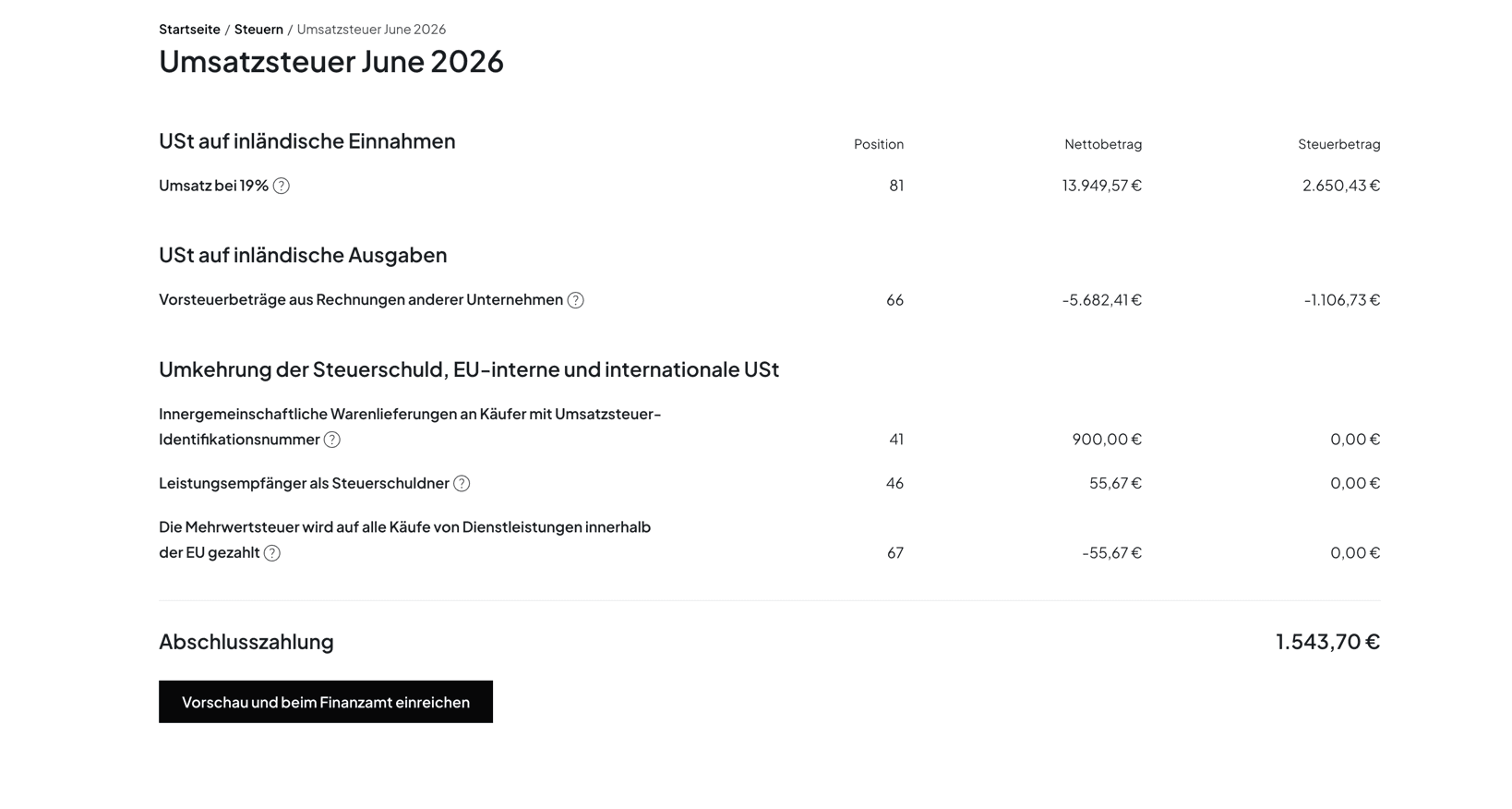
- Review the report. Under "Taxes", "Regular reports" shows one card per period. "Review and submit" shows every line with its form field in the "Position" column and the final payment. Norman shows you open transactions first.
- Look at the preview. "Preview and submit to Finanzamt" sends the return to ELSTER as a test case and shows the transmission protocol as the Finanzamt would see it.
- Approve. With "Submit to the Finanzamt", Norman submits the UStVA through the certified ELSTER interface; you do not need an ELSTER account of your own. You pay by direct debit, with "Pay now" from a connected account, or by transfer. With the tax autopilot, Norman builds each return at the end of the period and sends you the preview: one click and it is with the tax office.
You stay in control: nothing reaches the Finanzamt without your approval. Start for free: bookkeeping and the UStVA preview cost nothing. Filing starts at 9 € a month billed yearly for the self-employed, and comes with Max for UGs and GmbHs at 39 €. The full picture is on the Norman VAT return software page.
Changelog
- October 2026: New: worked example with reverse charge and a late-payment surcharge, deadlines to April 2027 with weekend shifts, a letter template for the reporting period, the founder rule from 2027, the cost of mistakes with legal references. The Norman section now follows the real flow in the app.
Frequently asked questions
- Can I apply to file the UStVA quarterly instead of monthly?
- There is no free choice. The law sets the period: if your VAT for the previous year was 9,000 € or less, the quarter is the standard period (§ 18 (2) UStG). If the Finanzamt still asks for monthly returns, write to it with last year's figure; a template is in the article above.
- Do I have to file a UStVA if I had no revenue?
- Yes. Unless the Finanzamt has exempted you, you submit a return for every period, with 0 € in every field if need be. If it is missing, the Finanzamt estimates your tax and can charge a late-filing surcharge.
- Does the VAT return apply to freelancers?
- Yes, freelancers have the same thresholds and deadlines. Freelancers in the liberal professions can apply for cash accounting (Ist-Versteuerung, § 20 sentence 1 no. 3 UStG): you then report VAT for the period in which the client pays. Trade businesses can do so up to 800,000 € of prior-year turnover.
- How do I calculate the VAT return?
- VAT on your net revenue for the period (19 % and 7 %) plus VAT from reverse charge, minus deductible input VAT from supplier invoices. The result is the amount due in field 83; if it is negative, you get the difference back.
- When do I fill in field 500?
- Only if a matter is not yet clarified (1), you deliberately deviate from the tax authority's view (2), you want a review by a case officer (3), or several apply (4). Any entry takes the return out of automated processing and needs a written explanation.
- Can I file the UStVA without a tax advisor?
- Yes. A tax advisor is not required. Fill in the form yourself in ELSTER, or let Norman, your AI Bookkeeper, calculate the fields automatically from your bank and receipts, then send the UStVA via ELSTER in one click, no ELSTER account needed.
Your UStVA in minutes: your AI Bookkeeper fills in the fields
Connect your bank, upload receipts: Norman maps revenue and input VAT to the right fields automatically, checks the return with ELSTER first and reminds you before every deadline. One click and your UStVA is filed with the tax office, no ELSTER account needed.